Skip to content

For hotels and guest houses up to 100 rooms

Bookings, check-in, cash desk and E‑mehmon in one program for the front desk

We set up your hotel in one day: we import bookings from Excel and train the front desk on site. For our first hotels it’s free for 1–2 months while Adminz services your network and Wi‑Fi.

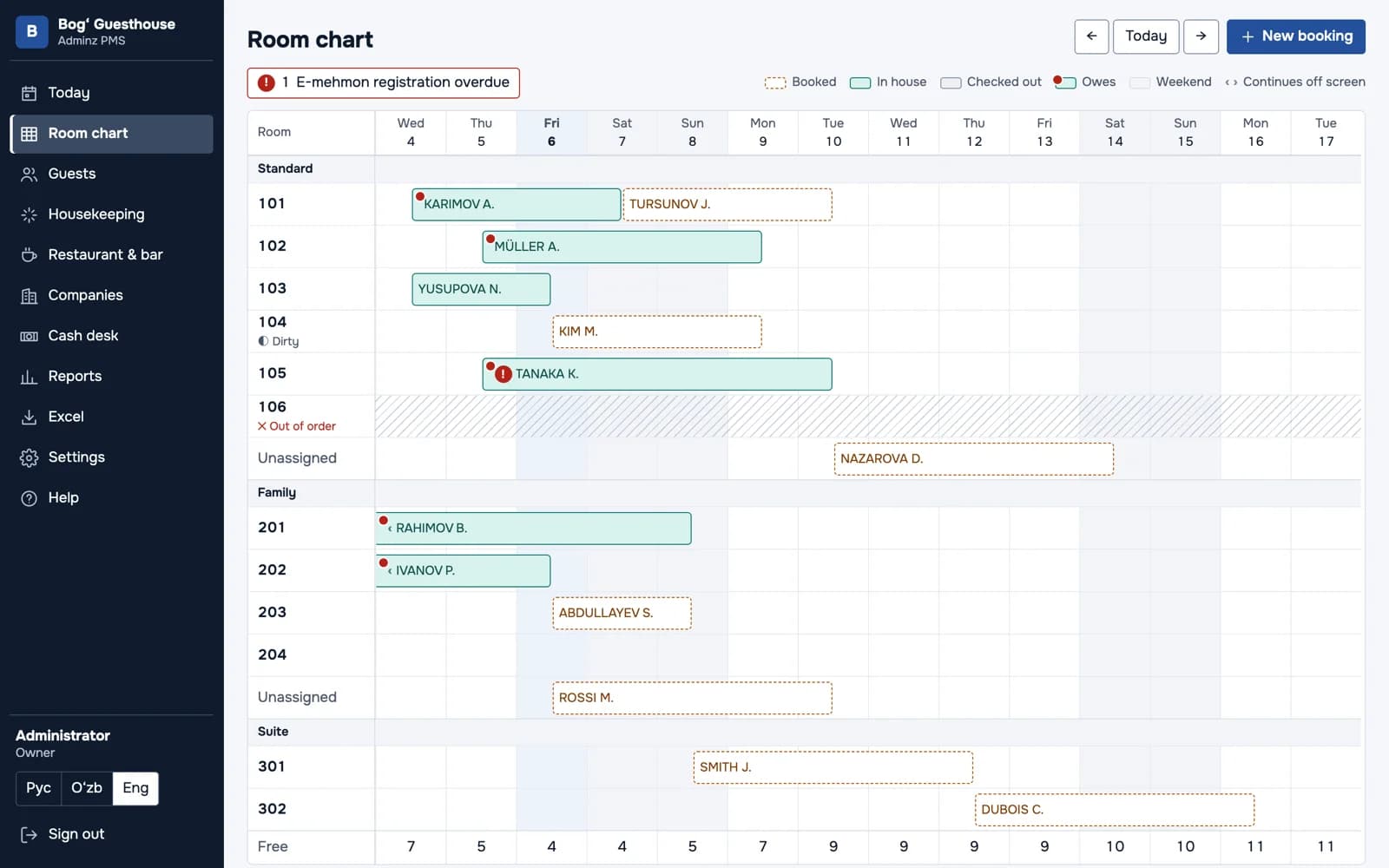
  • Tape chart: every room and booking on one screen; the same night in a room can never be sold twice
  • Lawful check-in: visa and passport checks, and the E‑mehmon deadline for every guest
  • Money in plain sight: guest folio, debts on the Today screen, cash shifts, and a morning summary to the owner on Telegram
See the demo

or call+998 33 078 58 78

Tape chartexampleBookedIn house
An example with made-up data: bookings arrive, guests check in, and the E‑mehmon deadline glows red until the receptionist marks it.

The real screen

Every room and booking by day on one screen

  • The tape chart updates itself: a booking from the website or another tab shows up right away
  • Several hotels under one login
  • The hotel’s own logo in the software and on the website
  • Room category names in three languages

Screenshot from the demo hotel “Bogʻ Guesthouse”, 12 rooms.

Tape chart: all rooms and bookings by day on one screen

E‑mehmon without stress

Every guest marked in E‑mehmon on time

At once

the E‑mehmon deadline shows from check-in: at once for foreigners, by end of day for citizens

each guest has their own deadline

One list

“Not registered” on the Today screen shows who to mark right now

overdue guests are highlighted in red

No slip-ups

the software will not check in a foreigner without a visa or visa-free entry

all card issues at once, not one by one

The receptionist can relax: the software reminds about the deadline and keeps the marks. The E‑mehmon mark itself is made by a person on the portal.

What the software does

Everything the front desk needs every day

01

Lawful check-in and E‑mehmon deadlines

The software will not let you check in a foreigner without a visa and shows the E‑mehmon deadline for every guest.

  • No visa or visa-free mark and no purpose of visit means no check-in for a foreigner
  • Room capacity and accompanied-child checks; all issues are shown at once, not one by one
  • The machine-readable line of a passport or ID card — read with a phone camera, a scanner or pasted — fills in the guest card; recognition runs on the device itself and passport scans are not stored
  • Foreigners immediately, citizens by the end of the day. Overdue shows in red, and the “not registered” list is on the Today screen

The receptionist makes the E‑mehmon entry on the portal, and the program makes sure no deadline slips by.
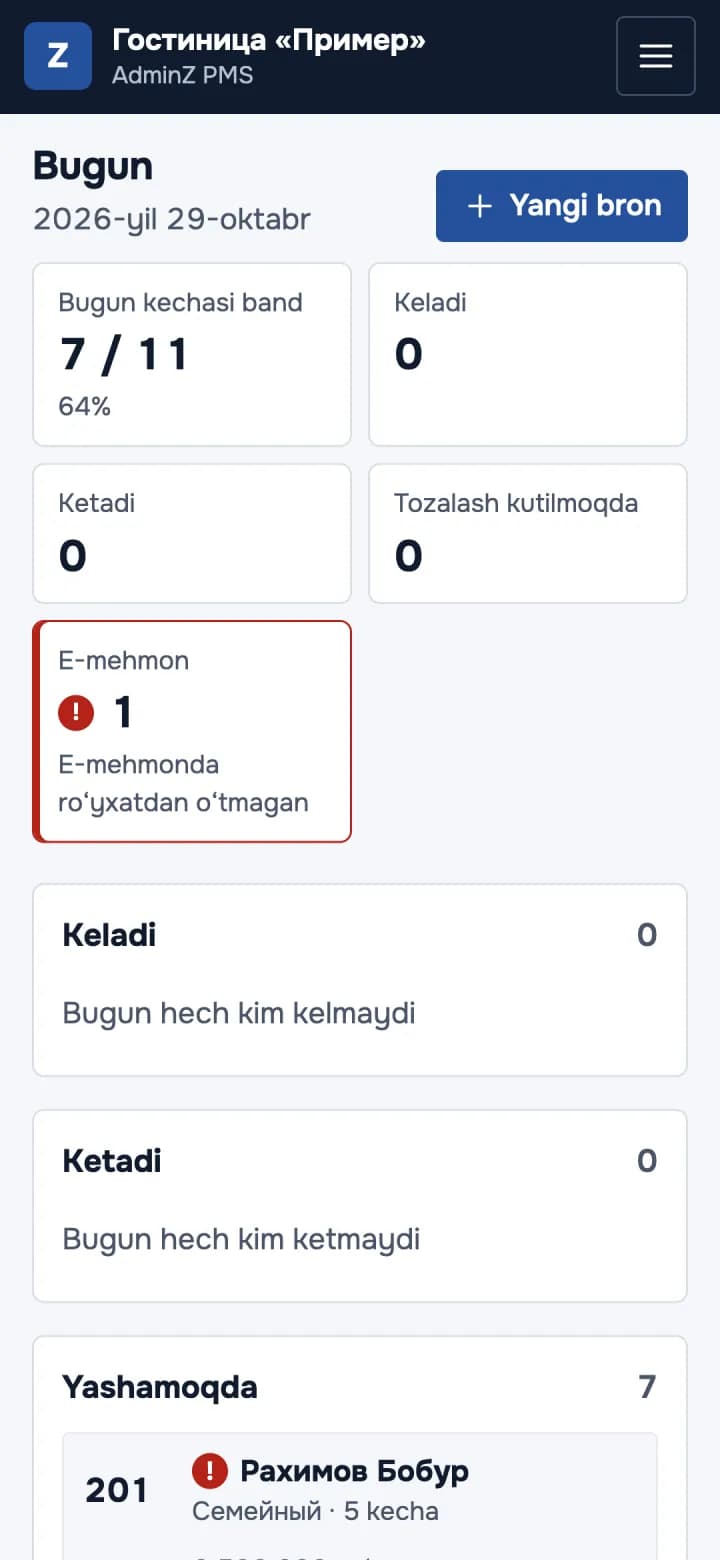
Today screen on a phone: arrivals, departures and guests not yet registered in E‑mehmon

02

Cash desk and folio: money is visible and does not go missing

  • Guest folio: stay, tourist tax, services, partial payments, balance due
  • A payment line cannot be deleted, only reversed
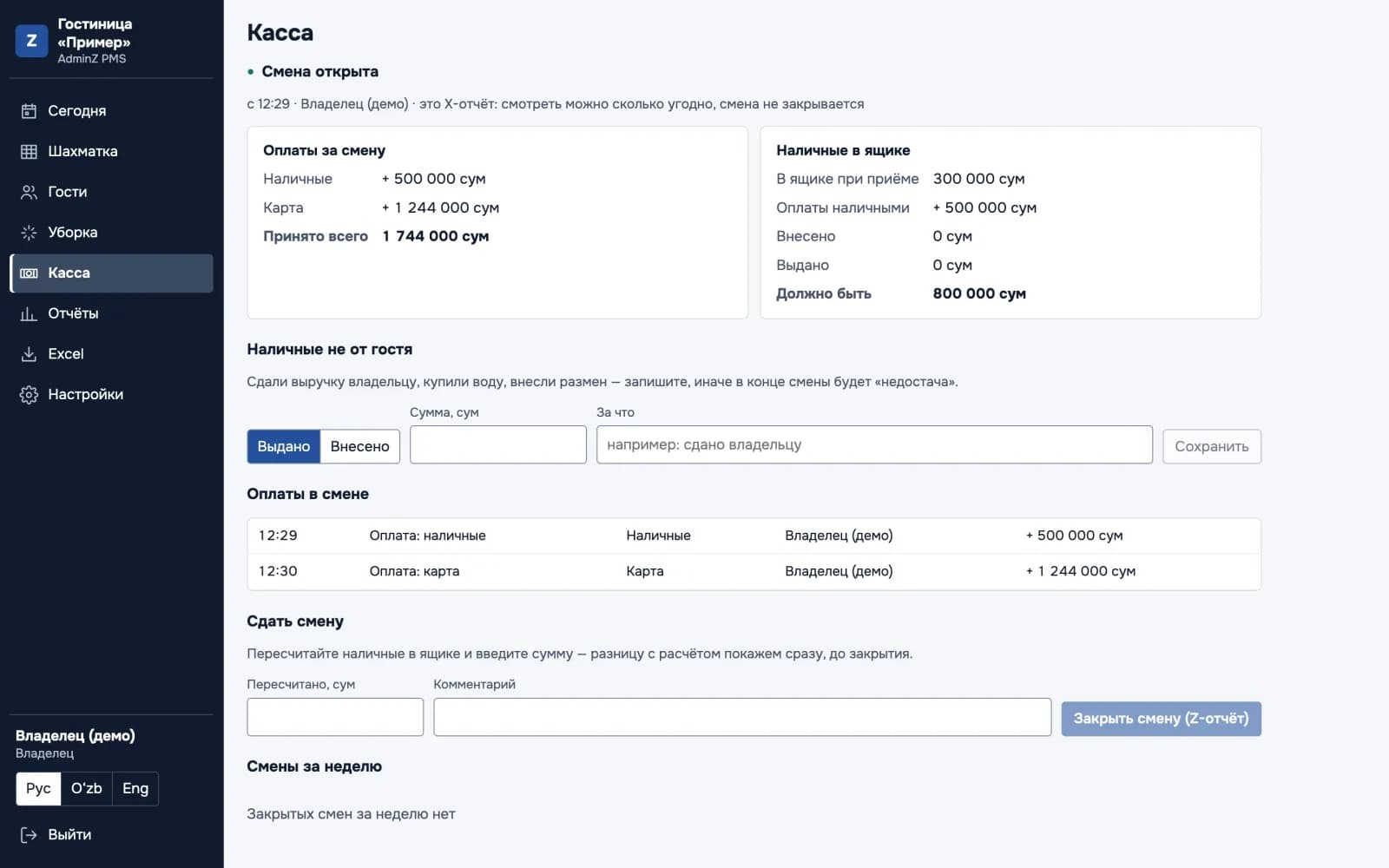
  • Cash shifts: drawer handover, X and Z reports, cash count
  • Tourist tax is calculated automatically; the monthly report is ready by the 5th
  • The action log writes itself and cannot be edited
  • Group bookings with a shared bill, rate plans (non-refundable, with meals), date changes and discounts with a stated reason
Cash shift: drawer amount, cash in and out, X report

03

One room cannot be sold twice

Even if a booking arrives from the website in the same second the receptionist is entering one by hand. The database itself enforces this, not people’s attention.

Verified by a test: 20 simultaneous bookings for 3 rooms, exactly 3 sold.

04

The owner sees the results without calling the front desk

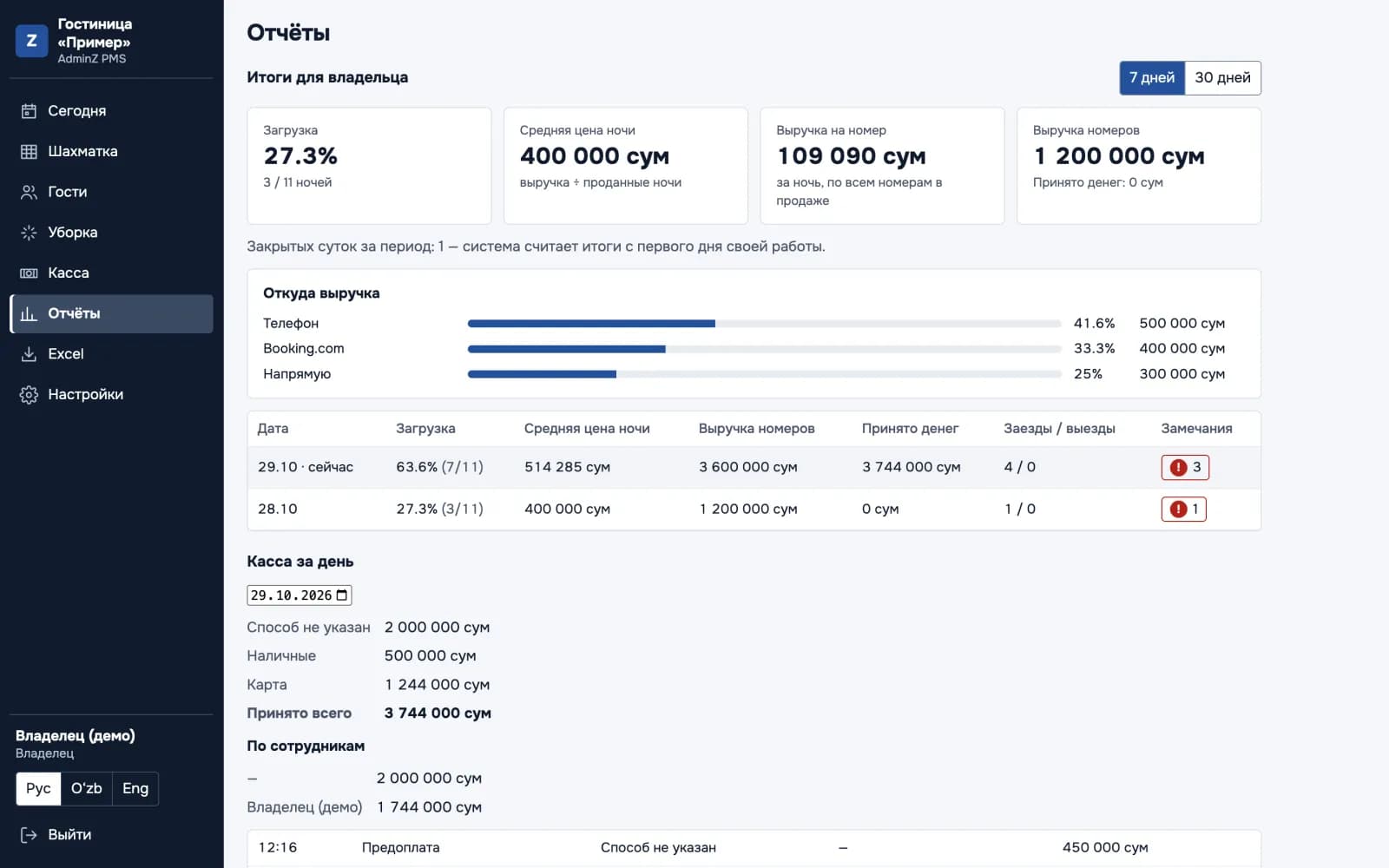
  • Occupancy, average nightly rate, revenue per room
  • Where bookings come from: phone, website, channels — as marked by the front desk
  • Daily results are closed overnight and cannot be rewritten
  • Daily cash by payment method and by staff member; shortfalls and issues by day
  • Front desk staff do not see reports and cannot change prices

The morning Telegram summary is connected when the hotel goes live.

Reports: occupancy, average rate, revenue and cash by staff member

05

Your own website for guests, and housekeeping from a phone

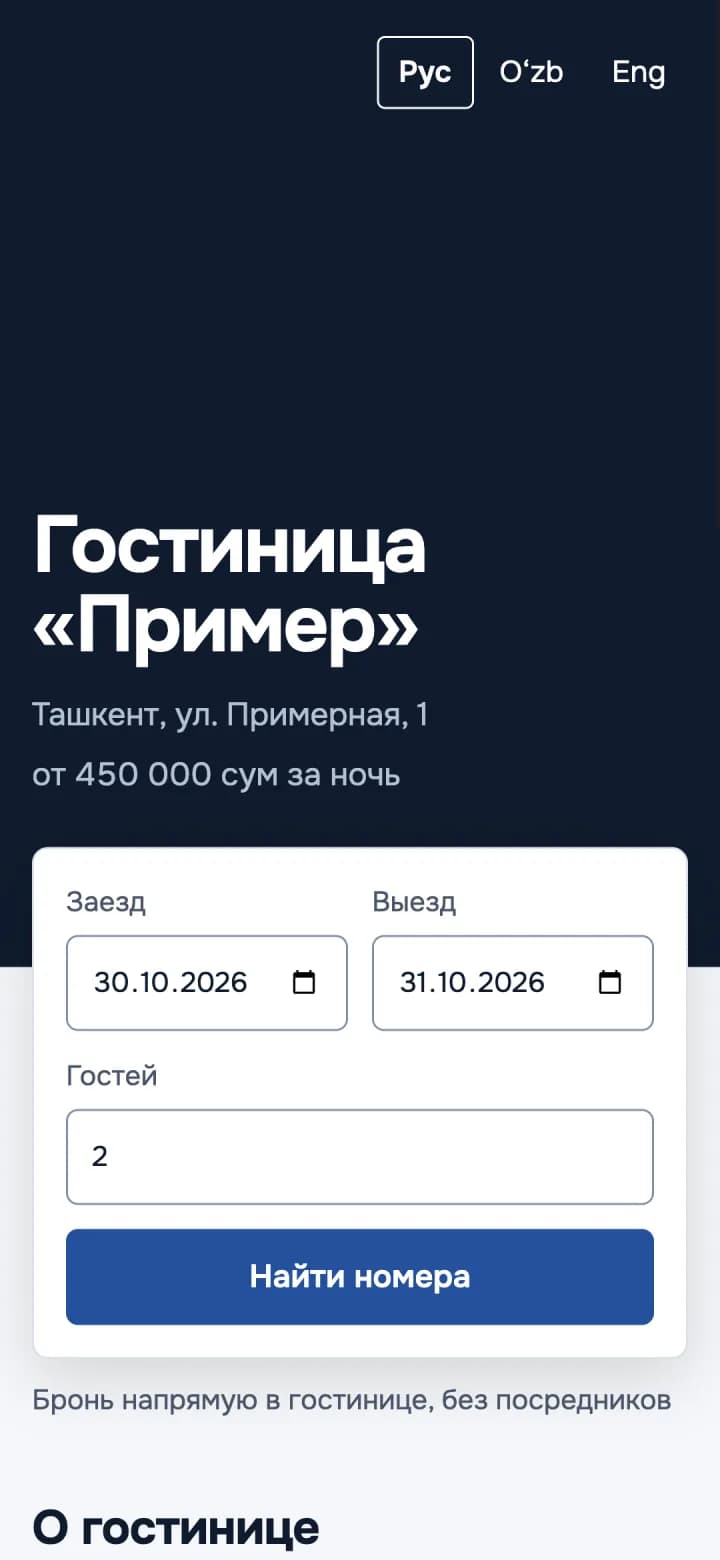
Hotel website with booking

Photos, rooms and prices in three languages. A booking lands straight on the tape chart, with no commission. The price always comes from the server.

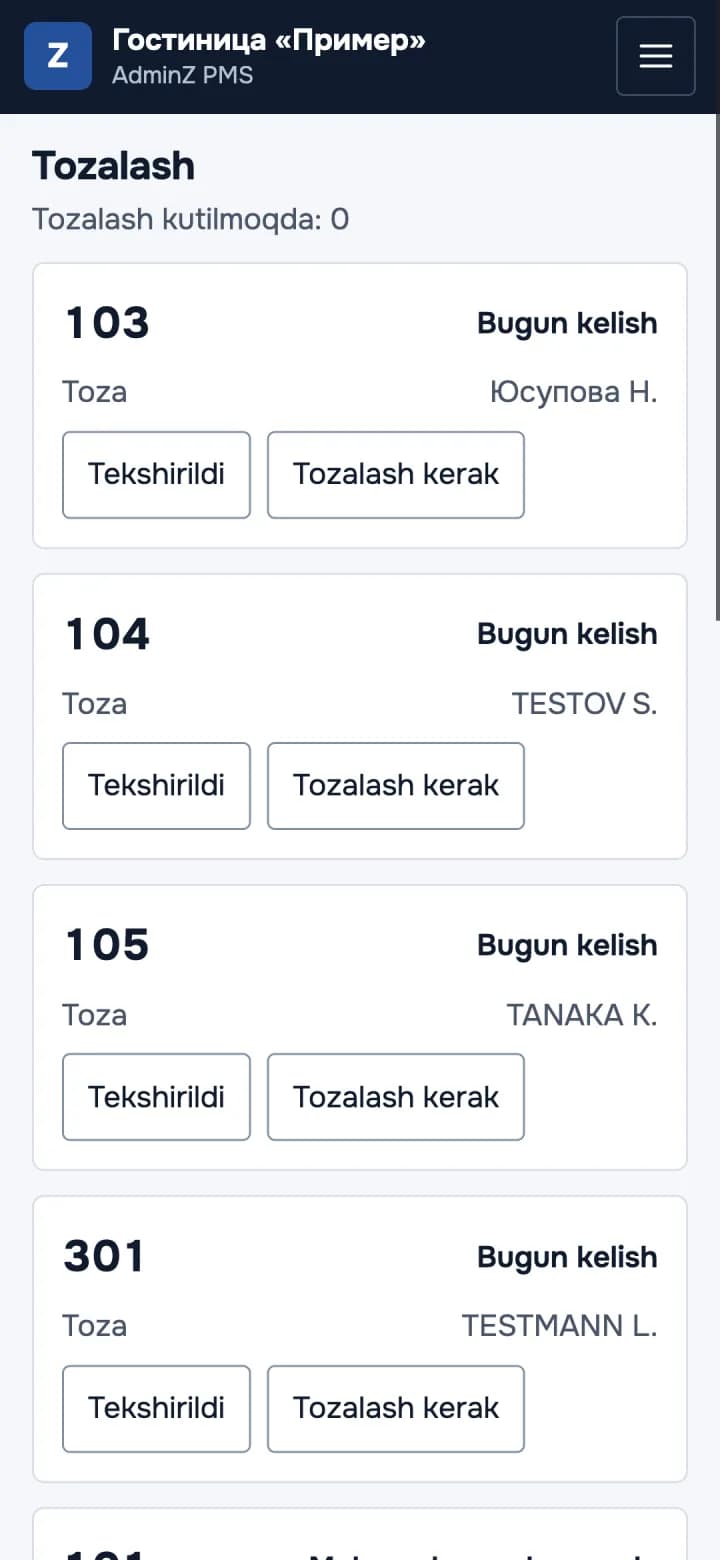
Housekeeping from a phone

Urgent rooms on top, one “Cleaned” button. Housekeeping sees only cleaning; the front desk sees right away that the room is ready.

We connect the hotel’s own domain at launch. Online payment via Payme and Click works under the hotel’s own contract with them.

Hotel website on a phone: photos, rooms and availability search
Hotel website
Housekeeping screen on a phone: list of rooms and a “Cleaned” button
Housekeeping screen

06

Moving from Excel by uploading a file

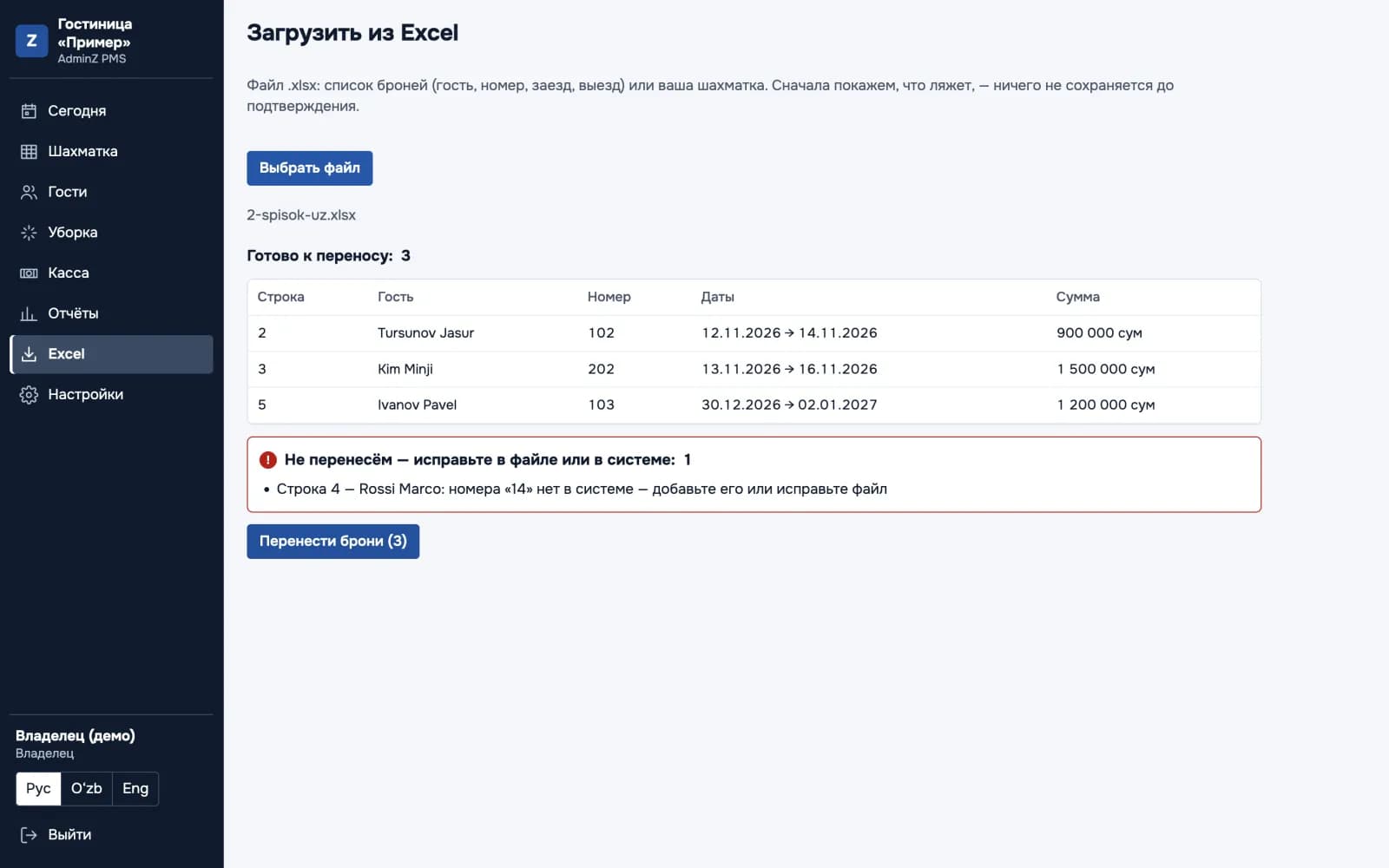
  • A booking list or your home-made tape chart, dates in any format, in Russian or Uzbek
  • Preview first: nothing is saved until you confirm
  • Rows that did not import are shown with the row number and the reason
  • We do the transfer ourselves during setup
Excel import preview: bookings and rejected rows with reasons

For our first hotels

PMS free while we service your network

  • Free for 1–2 months.While Adminz provides ongoing service for your network and Wi‑Fi. We quote the service fee after a site visit.
  • Up and running in one day.We set up the hotel, rooms and prices, import bookings from your spreadsheet, and show the front desk how to book, check in, take payment, check out and close a shift.
  • Guest Wi‑Fi from the program.A login or voucher on the router at check-in, revoked at check-out (MikroTik, UniFi). We’ll verify the first live router at your hotel, since we service your network anyway.
  • Then continue at the price below or walk away with no strings attached.We hand over your data as a full export.

Two options

On our server or on yours

Adminz cloud

Where the data lives
on our server
Who looks after the server
we do: backups, updates, security
What the hotel needs
a browser and internet
Start
in one day
Best for
almost every small hotel

On the hotel’s server

Where the data lives
on a computer at the hotel
Who looks after the server
the hotel: power and internet; we: updates and the database backup
What the hotel needs
a mini server with a UPS, and internet
Start
after on-site installation
Best for
those who want to keep their data on site

On-premises option: on request.

Prices

Per room, no per-user fees

Adminz cloud

Launch in one day
UZS 15,000

per room per month, minimum UZS 150,000 per month

12 roomsUZS 180,000 per month40 roomsUZS 600,000 per month
  • Pay a year ahead: 10 months instead of 12. 12 rooms: UZS 1,800,000 per year
  • For our first hotels: 1–2 months free with ongoing network and Wi‑Fi service
  • Setup on request: importing bookings from Excel, rooms and prices, training the front desk on site
  • Included: every feature, the hotel website with booking, staff at no extra cost, legal updates

On the hotel’s server

On request

a licence for the hotel, installed on site

  • Support: legal updates (base calculation value, tourist tax rates), help desk, nightly database backup
  • Hardware: your own PC with at least 2 cores, 4 GB of RAM and a 40 GB SSD, or our kit: a mini PC, SSD and UPS. We quote the kit price on the invoice.

Prices in UZS. Adminz is not a VAT payer; no VAT is added.

Frequently asked questions

How much does it cost?

UZS 15,000 per room per month, minimum UZS 150,000. No charge per user. Pay a year ahead: 10 months instead of 12.

How fast can we start?

We set up your hotel in one day: rooms and prices, bookings imported from Excel, front desk trained on site.

How does it help with E‑mehmon?

The Today screen shows every guest’s deadline and a list of those still to be registered. The receptionist makes the entry on the portal.

What about receipts and e-invoices?

Receipts are printed as they are today. The program keeps the guest folio, payments and cash shifts.

Does it work with Booking and Airbnb?

At first, the receptionist enters channel bookings by hand — they land on the tape chart at once and never overlap with others.

Can we take payments via Payme and Click?

We connect them under the hotel’s own contract with Payme and Click, once it is signed.

Do we need to install an app?

No. The program runs in the browser, on the front-desk computer and on phones.

Why Adminz

We are an IT integrator in Tashkent: Wi‑Fi, cameras, telephony and software from one contractor, with on-site visits.

See the demo